
 0 items –
 Commercial Catering Equipment and Supplies at Display-Fridge Wholesale Ltd
Fridge Breakdown Emergency Plan: What to Do When a Commercial Fridge Fails
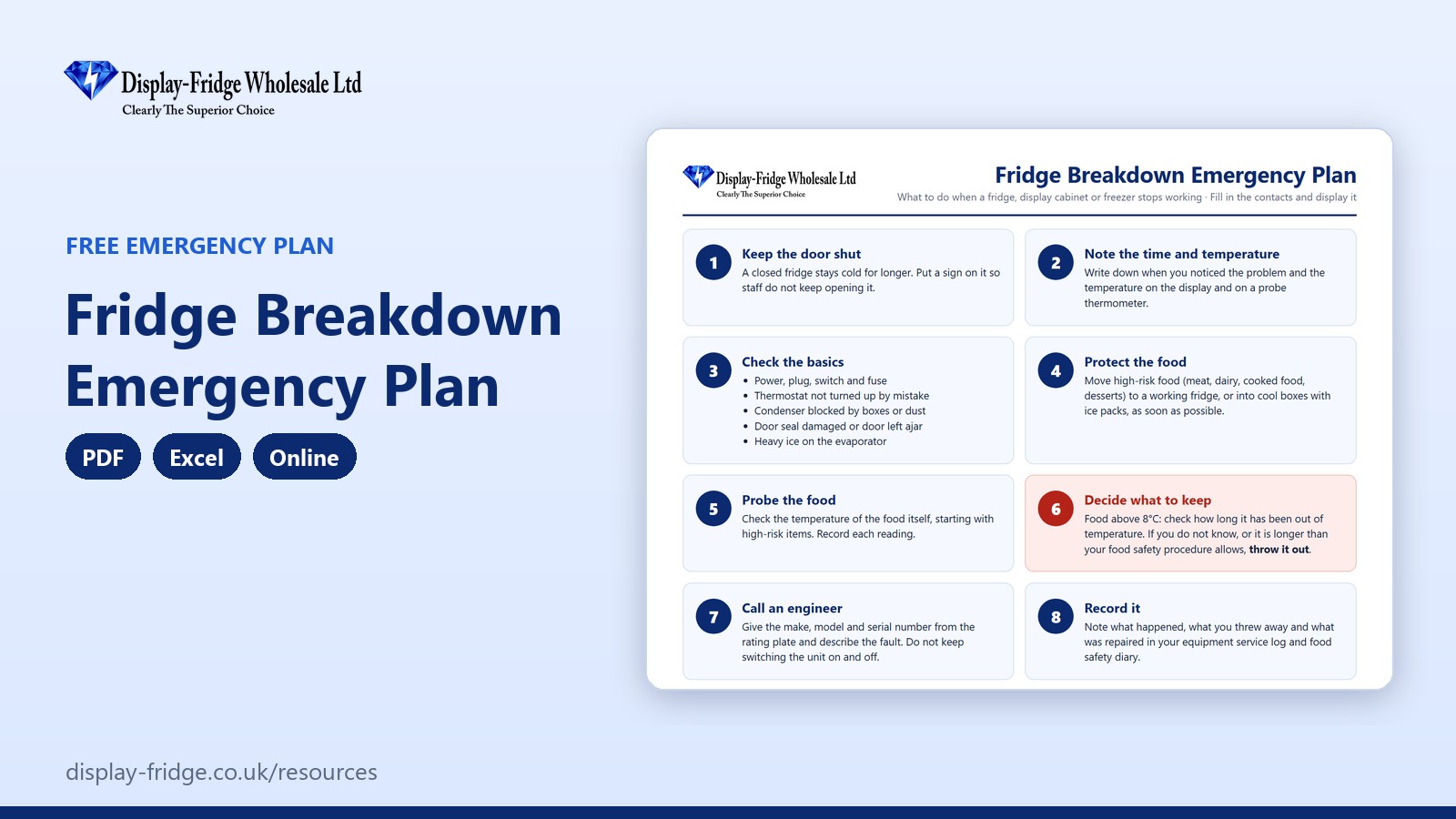
A free fridge breakdown emergency plan: eight steps to follow when a commercial fridge, display cabinet or freezer stops working, with an emergency contacts sheet to fill in and display.
Use the emergency plan online
Online Fridge Breakdown Emergency Plan
Fill in your emergency contacts once. When a fridge fails, work down the steps and tap each one as you complete it.
Based on FSA guidance for England, Wales and Northern Ireland; in Scotland check Food Standards Scotland guidance. Entries are stored only in this browser on this device, so print or download them for your records.
Free tool by Display-Fridge Wholesale
Frequently asked questions
What is a fridge breakdown emergency plan?
A one-page set of steps to follow when a commercial fridge, display cabinet or freezer stops working, with your emergency contacts, so any member of staff knows what to do.
What is the fridge breakdown plan for?
It protects your food and your customers when equipment fails, and helps staff make the right decisions about what to keep and what to throw away.
Who should know the fridge breakdown plan?
Everyone who works with your fridges, including weekend and evening staff who may be alone when a unit fails.
What should I do first if a commercial fridge breaks down?
Keep the door shut, note the time and temperature, and check the basics: power, plug, fuse, thermostat, blocked condenser and door seal.
How long will food stay safe in a broken fridge?
It depends on how full the fridge is, the room temperature and how often the door is opened. Probe the food itself: food above 8°C for an unknown time should be thrown away.
Where should the breakdown plan be displayed?
On the wall near your fridges, with the contacts filled in, and a copy in the office or on a tablet.
When should the breakdown plan be prepared?
Now, before anything goes wrong. Fill in the engineer’s details, the back-up storage and where the cool boxes are kept.
What details does the engineer need?
The make, model and serial number from the rating plate, the fault, when it started and the temperatures you recorded.
How does a breakdown plan help my business?
It reduces the stock you lose, avoids unsafe decisions under pressure and gets the engineer there faster with the right information.
Is the online breakdown plan saved?
Yes, in the browser on your device only. Nothing is sent to us. Print it and keep it on the wall.
Your business with our breakdown plan, and without
| Using our breakdown plan | Without it | |
|---|---|---|
| When a unit fails | Staff follow eight clear steps | Panic, and the door opened again and again |
| Engineer | Number and unit details ready to give | Searching for a phone number and serial plate |
| Food decisions | Probe readings and a clear rule on what to keep | Guesswork, and too much or too little thrown away |
| Back-up storage | Known in advance | Food left in a warm fridge while you decide |
| Records | What happened and what was lost, written down | No record for insurance or the next inspection |
| Format | PDF poster, Excel and online, free | Nothing written down |
Why you need a breakdown plan before it happens
Commercial fridges usually fail at the worst moment: a hot afternoon, a busy weekend, the night before a big order. Without a plan, staff open the door to look, move food around without checking it and either throw away too much or keep food that should have gone. A one-page plan, with contacts filled in, turns panic into a routine.
The first ten minutes
Keep the door shut: a closed fridge stays cold for a surprisingly long time. Note the time and the temperature, both on the display and with a probe. Then check the simple things: the power, the plug and fuse, the thermostat, whether the condenser is blocked by boxes or dust, and whether the door was left ajar.
Protecting the food
Move high-risk food, such as meat, dairy, cooked food and desserts, to a working fridge or into cool boxes with frozen ice packs. Probe the food itself, starting with the highest-risk items, and record each reading.
Deciding what to keep
Food that is still at 8°C or below can usually be kept. For food above 8°C, the question is how long it has been warm. If you do not know, or it has been longer than your food safety procedure allows, throw it away. If in doubt, throw it out: the cost of the food is far less than the cost of a food poisoning case.
After the repair
Record what happened, what you threw away and what was repaired. Repeated breakdowns on the same unit are a sign it is time to replace it; the equipment register helps you see the pattern.
How to use the breakdown plan, step by step
Fill in your contacts now
Enter your engineer, out-of-hours number, manager on call, back-up storage, where the cool boxes are kept and the unit details. Print the plan and put it on the wall.

Emergency contacts and unit details When a unit fails, work down the steps
Tap each step as you complete it and write readings and findings in the notes, such as the time, the display temperature and the probe temperature.
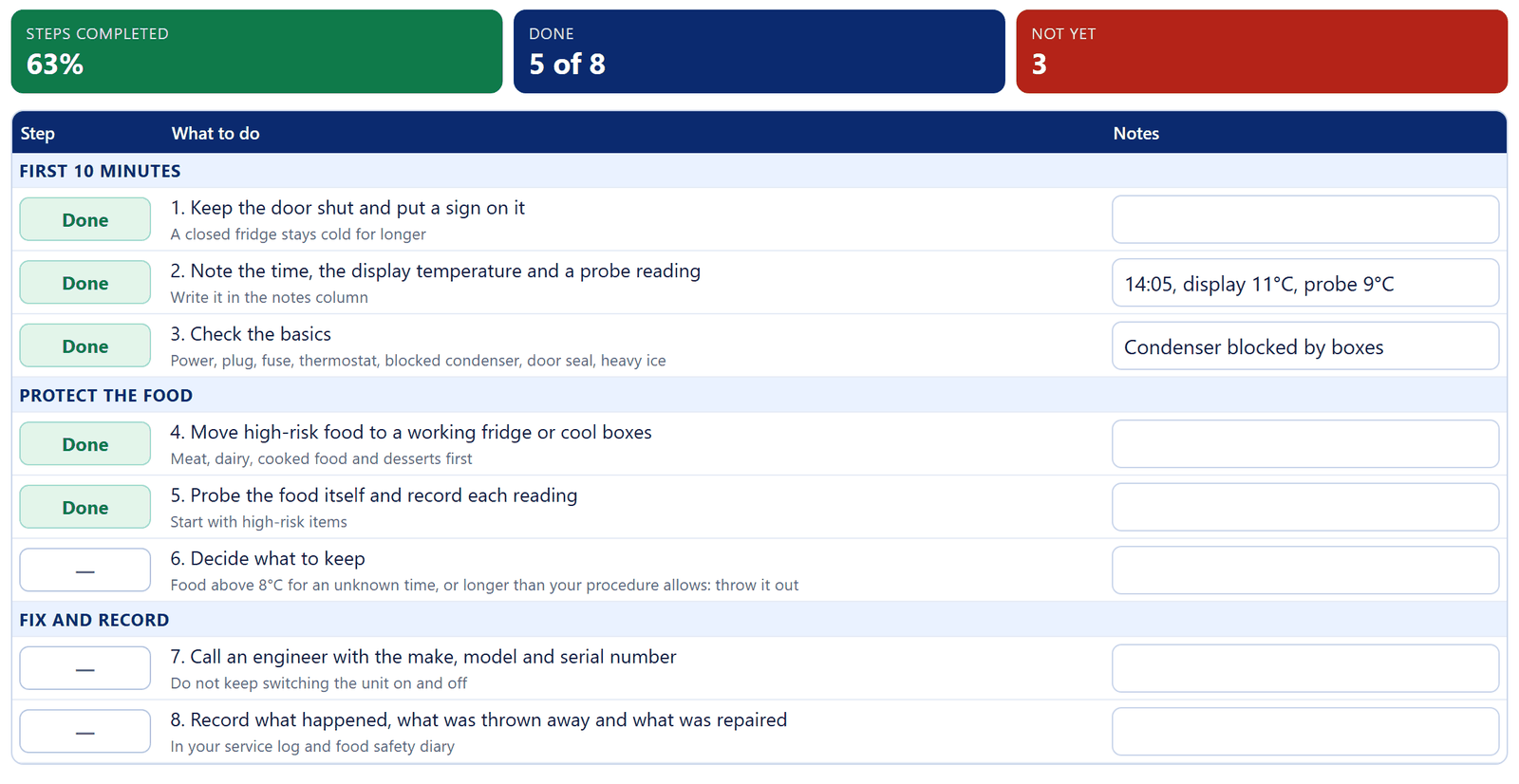
Five of the eight steps completed, with notes Decide what to keep, then call the engineer
Follow step 6 for the food, then call the engineer with the make, model and serial number.
Record the incident
Print the completed plan, and log the breakdown in the Excel version’s incident log: downtime and the total cost of food lost and repairs are worked out for you.

Print and clear buttons
Be ready before it happens
- Keep cool boxes and frozen ice packs on site.
- Know which fridge can take extra stock in an emergency.
- Keep the engineer’s number on the wall and in your phone.
- Book a yearly service: many breakdowns start with a dirty condenser, a failing fan or a worn door seal.
- Keep spare parts that fail most often, such as fans and small parts and controllers.
Related free resources
- Refrigeration Equipment Register & Service Log: record every breakdown and repair.
- Commercial Fridge Cleaning Schedule: the cleaning that prevents many breakdowns.
- Fridge & Freezer Temperature Log: spot a failing unit before it stops.
- All free resources.
These resources follow Food Standards Agency guidance for England, Wales and Northern Ireland. If your business is in Scotland, check the guidance from Food Standards Scotland. They support your food safety management system, such as Safer Food, Better Business, and do not replace it.