
 0 items –
 Commercial Catering Equipment and Supplies at Display-Fridge Wholesale Ltd
Free Opening & Closing Checklist for Food Businesses
A free daily opening and closing checklist for cafés, bakeries, cake shops, butchers, delis and food shops. Twenty-one checks, a weekly equipment care list and a score for each day.
Use the checklist online
Online Daily Opening & Closing Checklist
Tap a box to cycle through ✓ done, ✗ not done and N/A. Each day's score updates as you go. Your ticks are saved in this browser for each week.
Weekly equipment care
Problems found and action taken
Use it together with the Fridge & Freezer Temperature Log. Based on FSA guidance for England, Wales and Northern Ireland; in Scotland check Food Standards Scotland guidance. Ticks are stored only in this browser on this device, so print the week for your food safety records.
Free tool by Display-Fridge Wholesale
Frequently asked questions
What is an opening and closing checklist?
A list of the checks that should be done every day before the first customer and after the last one, plus a few checks during service. Ours covers temperatures, dates, stock rotation, allergen labels, cleaning, hand washing and the condition of your fridges.
What is an opening and closing checklist for?
It makes sure the important jobs are done every day, by whoever is on shift, and it gives you a written record that they were done.
Who can use the opening and closing checklist?
Any food business with a counter, kitchen or shop floor: cafés and coffee shops, bakeries, cake shops, butchers, delis, farm shops, convenience stores and takeaways. Staff tick the checks; the manager initials each day.
Why should my business use an opening and closing checklist?
Routines slip when a business is busy or short-staffed. A checklist removes the guesswork, helps new staff learn quickly and shows an inspector that your food safety procedures are followed every day.
Where should the opening and closing checklist be kept?
Somewhere staff pass at the start and end of every shift: by the kitchen door, next to the fridges or on a tablet behind the counter.
When should the opening and closing checklist be used?
Every day you are open. Opening checks before the first customer, service checks during the day and closing checks after the last customer. The weekly equipment care checks can be done on a fixed day each week.
How does an opening and closing checklist help my business?
Fewer things are forgotten, problems are spotted earlier and you have evidence for your next food hygiene inspection. The closing checks, such as fitting night blinds and keeping vents clear, also reduce energy use and protect your equipment.
Does the opening and closing checklist replace the Safer Food, Better Business diary?
No. It works alongside SFBB or your own HACCP plan. Many businesses use it as the detailed daily routine and record a summary in their diary.
Can I add my own checks to the opening and closing checklist?
Yes. The Excel version can be edited, so you can add checks that are specific to your business, such as cleaning a slicer or checking a coffee machine.
What if a check on the opening and closing checklist is not done?
Mark it ✗ and write what happened and what you did in the problems section. A ✗ with an action is far better than a blank.
Is the online opening and closing checklist saved?
Yes, in the browser on your device, week by week. Nothing is sent to us. Print each week for your food safety records.
Your business with our checklist, and without
| Using our checklist | Without it | |
|---|---|---|
| Daily routine | The same 21 checks every day, whoever is on shift | Each person remembers different things |
| New staff | Learn the routine from the sheet on day one | Learn by trial and error |
| Missed jobs | A blank box or ✗ is visible at a glance | Nobody notices until something goes wrong |
| Inspections | A week-by-week record of checks and actions | Hard to show that the routine is followed |
| Equipment | Seals, vents, night blinds and condensers checked regularly | Small faults left until they become breakdowns |
| Energy | Night blinds and closing habits cut overnight costs | Units left working harder than they need to |
Why daily opening and closing checks matter
Most food safety problems do not come from one big mistake. They come from small jobs that are skipped on a busy day: a temperature not checked, a use-by date missed, a label left off, a fridge door not closed properly at night. A short checklist, used every day, stops those small gaps from adding up.
Consistency between shifts
In a business with several staff, the opening team and the closing team may never meet. The checklist is how they hand over. The morning shift can see that the closing checks were done, and the manager can see the whole week on one sheet.
Allergen labelling and Natasha’s Law
Since October 2021, food that is prepacked for direct sale, such as sandwiches and cakes packed on the premises, must carry a full ingredients list with allergens emphasised. Checking that labels are in place and readable each morning is a simple way to stay on top of it, especially for grab-and-go fridges.
Looking after your fridges
Several checks protect your equipment as well as your food. Clean door seals keep cold air in, as our guide to cleaning door gaskets explains. Clear vents and a dust-free condenser stop the compressor from overworking. On open multideck fridges, night blinds reduce energy use after closing. Our article on keeping a multideck fridge working well has more detail.

How to use the checklist, step by step
Start the week
Enter your business name, the first day of the week and the manager’s name. The progress bar shows how much of the week is complete.

Business name, week commencing and manager fields of the online checklist Tick as you go
Tap a box once for ✓ (done), twice for ✗ (not done) and three times for N/A. The ‘Completed’ row shows each day’s score, and the manager initials the day at the bottom.
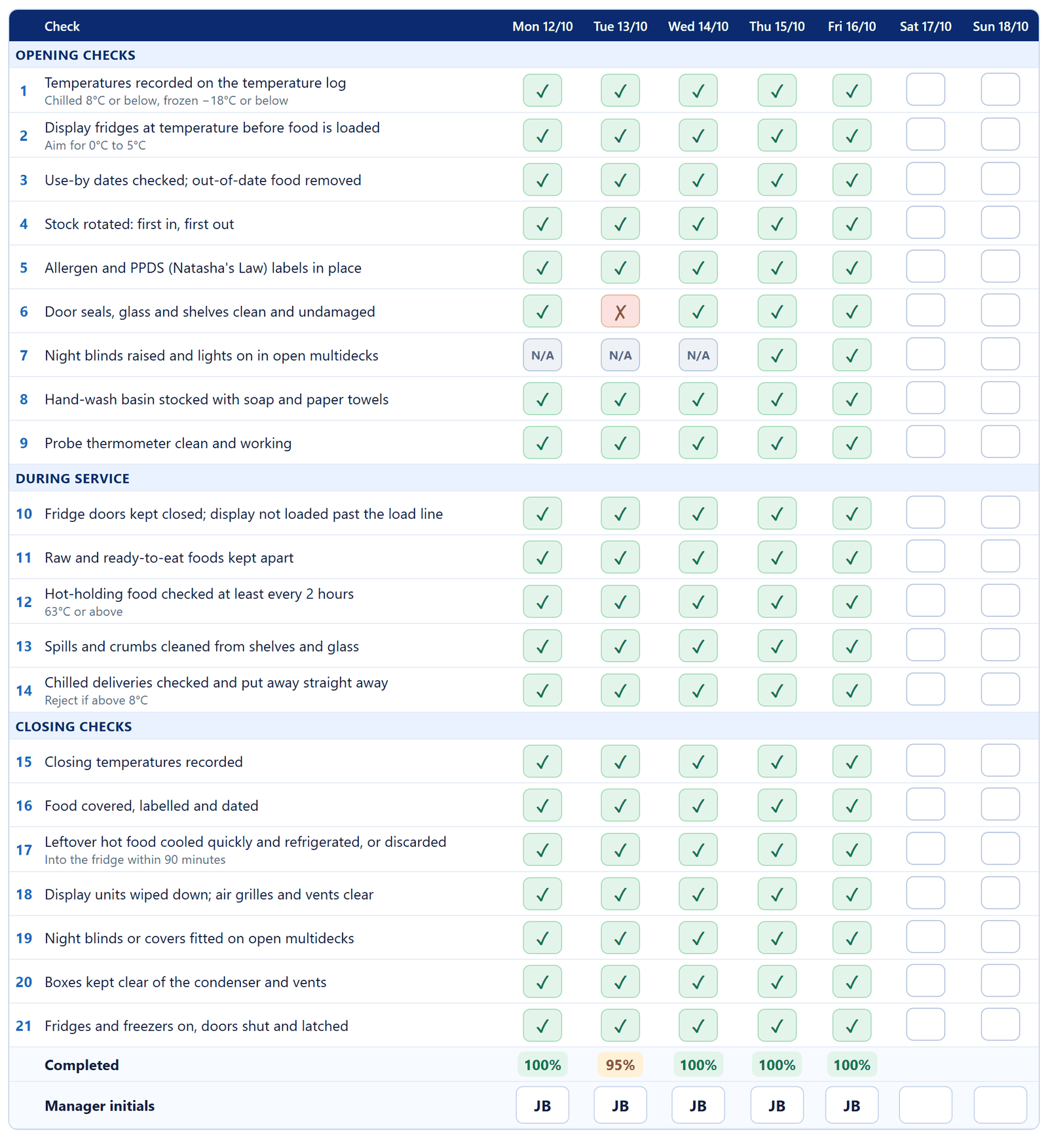
Daily checks ticked, with the completion score for each day Do the weekly equipment care
Enter the date and your initials when you check the probe thermometer, clean the gaskets, dust the condenser and clear the drain holes. Write any problem and the action taken underneath.
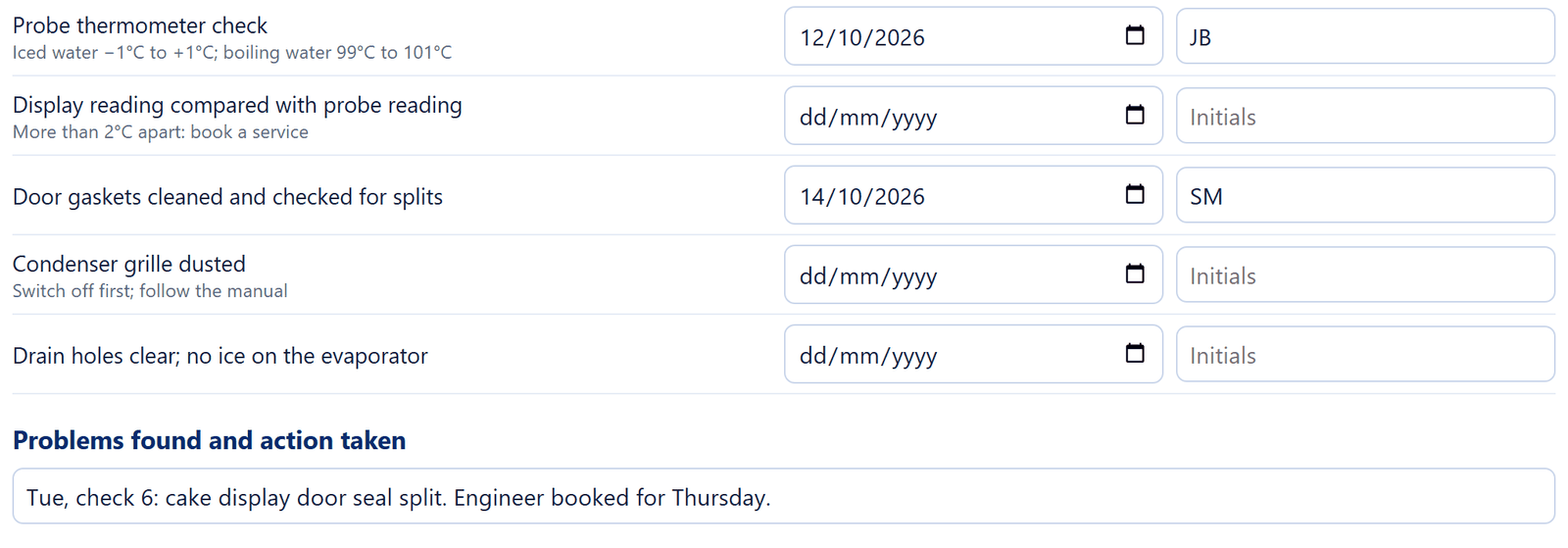
Weekly equipment care dates and a problem with the action taken Print and file
At the end of the week, print the checklist or save it as a PDF and keep it with your food safety records. Use ‘Jump to this week’ to start the next one.

Print, jump to this week and clear buttons of the online checklist
Make it fit your business
- Cafés and coffee shops: add milk fridge temperature, coffee machine cleaning and cake display labelling.
- Bakeries and cake shops: add cream product rotation and the patisserie display temperature at midday.
- Butchers and delis: add slicer cleaning, separate raw and ready-to-eat equipment and the serve-over counter temperature.
- Convenience stores: add multideck load lines, date checks on meal deals and night blinds on open fridges.
Related free resources
- Fridge & Freezer Temperature Log: the first check every morning and the last every night.
- Running Cost Calculator: see how much your closing habits save.
- All free resources.
These resources follow Food Standards Agency guidance for England, Wales and Northern Ireland. If your business is in Scotland, check the guidance from Food Standards Scotland. They support your food safety management system, such as Safer Food, Better Business, and do not replace it.