
 0 items –
 Commercial Catering Equipment and Supplies at Display-Fridge Wholesale Ltd
Free Probe Thermometer Calibration Record
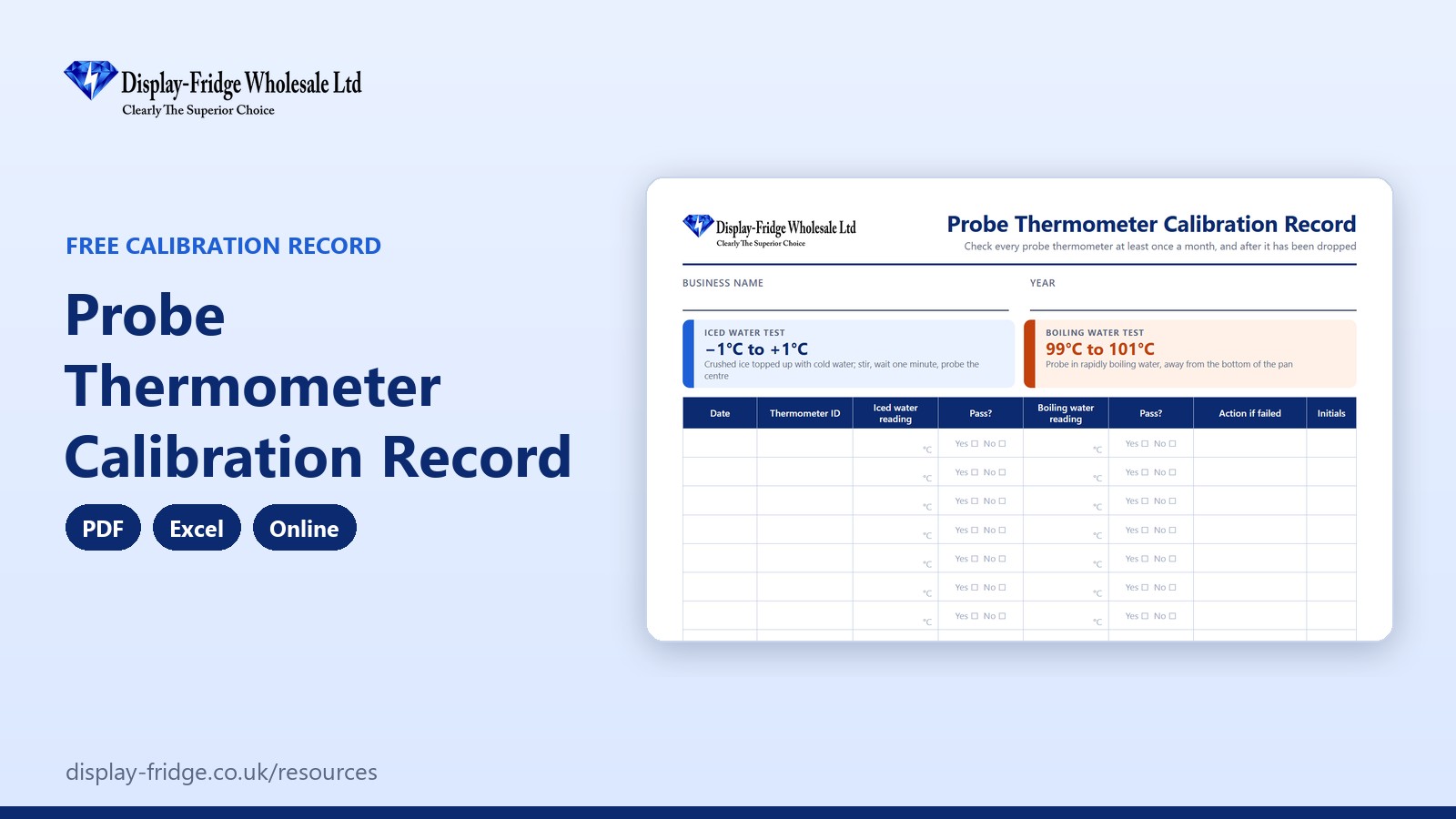
A free probe thermometer calibration record for UK food businesses. Test each probe in iced water and boiling water: pass or fail, and the next check date, are worked out for you.
Fill in the calibration record online
Online Probe Thermometer Calibration Record
Test each probe in iced water and boiling water and type the readings. Pass or fail, and the next check date, are worked out for you.
Based on FSA guidance for England, Wales and Northern Ireland; in Scotland check Food Standards Scotland guidance. Entries are stored only in this browser on this device, so print or download them for your records.
Free tool by Display-Fridge Wholesale
Frequently asked questions
What is a probe thermometer calibration record?
A record of regular accuracy checks on each probe thermometer, using iced water and boiling water, with the result and any action taken.
What is the probe thermometer calibration record for?
It shows that the thermometers behind all your temperature records read correctly, and that faulty probes are taken out of use.
Who should check probe thermometers?
A manager or a trained member of staff. It takes a few minutes per probe.
How often should a probe thermometer be calibrated?
At least once a month, and whenever a probe has been dropped or gives a reading that seems wrong.
What reading should a probe give in iced water?
Between −1°C and +1°C, in a glass of crushed ice topped up with cold water, after stirring and waiting a minute.
What reading should a probe give in boiling water?
Between 99°C and 101°C, with the tip in rapidly boiling water and away from the bottom of the pan.
Where should the calibration record be kept?
With your other food safety records, or on a tablet using the online or Excel version.
What if a probe thermometer fails the test?
Stop using it, label it as faulty, change the battery and test again. If it still fails, replace it.
How does a calibration record help my business?
It makes your fridge, cooking and cooling records trustworthy, and shows an inspector that your monitoring equipment is checked.
Is the online calibration record saved?
Yes, in the browser on your device only. Nothing is sent to us. Print it or download a CSV file regularly.
Your business with our calibration record, and without
| Using our calibration record | Without it | |
|---|---|---|
| Accuracy | Every probe tested monthly | A faulty probe used for months |
| Temperature records | Readings you can trust | Records that may be wrong |
| Failed probes | Flagged and taken out of use | Still in the drawer, still being used |
| Inspections | Proof your monitoring equipment is checked | No evidence the probes are accurate |
| Next check | Date worked out for you | Forgotten until something goes wrong |
| Format | PDF, Excel and online, free | No record at all |
Why calibrate your probe thermometer?
Every temperature you record, from fridge checks to cooking and cooling, depends on your probe thermometer being accurate. A probe that reads 2°C low will tell you a fridge at 9°C is at 7°C. Checking probes regularly, and recording the result, is how you know your other records can be trusted.
The iced water test
Fill a glass with crushed ice and top it up with cold water. Stir and wait a minute. Put the probe in the centre, not touching the glass, and wait until the reading stops changing. It should read between −1°C and +1°C.
The boiling water test
Put the probe in rapidly boiling water, away from the bottom of the pan. It should read between 99°C and 101°C. Take care with steam and hot water.
When a probe fails
Stop using it and label it as faulty. Change the battery and test again. If it still fails, replace it, and think about whether any recent readings taken with it need checking again.
How to use the calibration record, step by step
Check the pass ranges
Enter your business name. The pass ranges are −1°C to +1°C in iced water and 99°C to 101°C in boiling water, with a check every 30 days.

Pass ranges, check interval and counters Test each probe and type the readings
Tap ‘+ Add a check’, enter the thermometer ID and the two readings. The Result column shows Pass, with the next check date, or Fail.
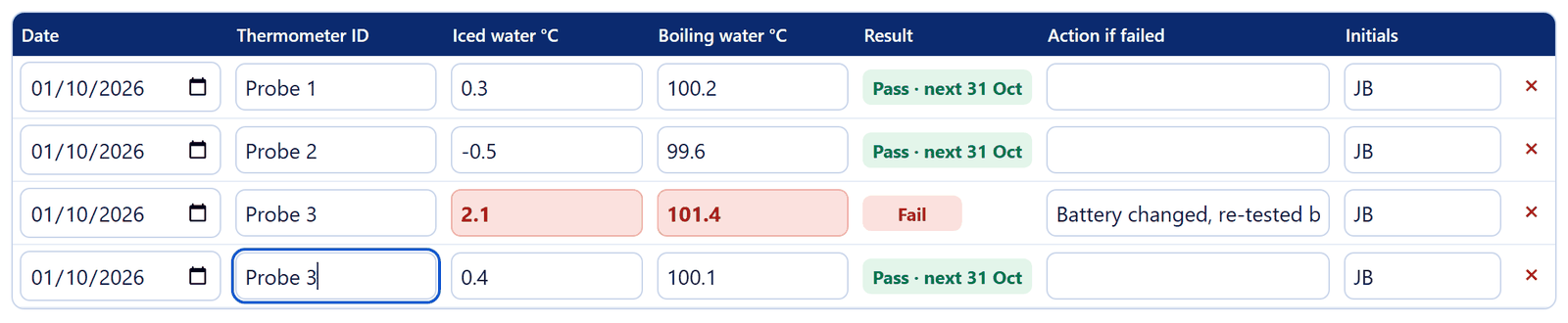
Three probes tested; one failed and passed after a battery change Act on a fail
Write what you did in ‘Action if failed’, change the battery and add a new row for the re-test. Replace the probe if it fails again.
Keep your records
Print the record or save it as a PDF, or download a CSV file. Prefer paper? Print the PDF record.

Add, print, download and clear buttons
Using a probe correctly
- Clean and sanitise the probe before and after each use, using probe wipes.
- Insert the tip into the thickest part of the food.
- Wait until the reading stops changing before you record it.
- Use separate probes, or clean thoroughly, between raw and ready-to-eat food.
- Compare your fridge displays with the probe once a week: more than 2°C apart means the unit needs a service.
Related free resources
- Fridge & Freezer Temperature Log: where most of your probe readings are recorded.
- Delivery & Goods-In Temperature Log: probe deliveries before you sign for them.
- Food Cooling Log: check cooled food at the next check.
- All free resources.
These resources follow Food Standards Agency guidance for England, Wales and Northern Ireland. If your business is in Scotland, check the guidance from Food Standards Scotland. They support your food safety management system, such as Safer Food, Better Business, and do not replace it.