
 0 items –
 Commercial Catering Equipment and Supplies at Display-Fridge Wholesale Ltd
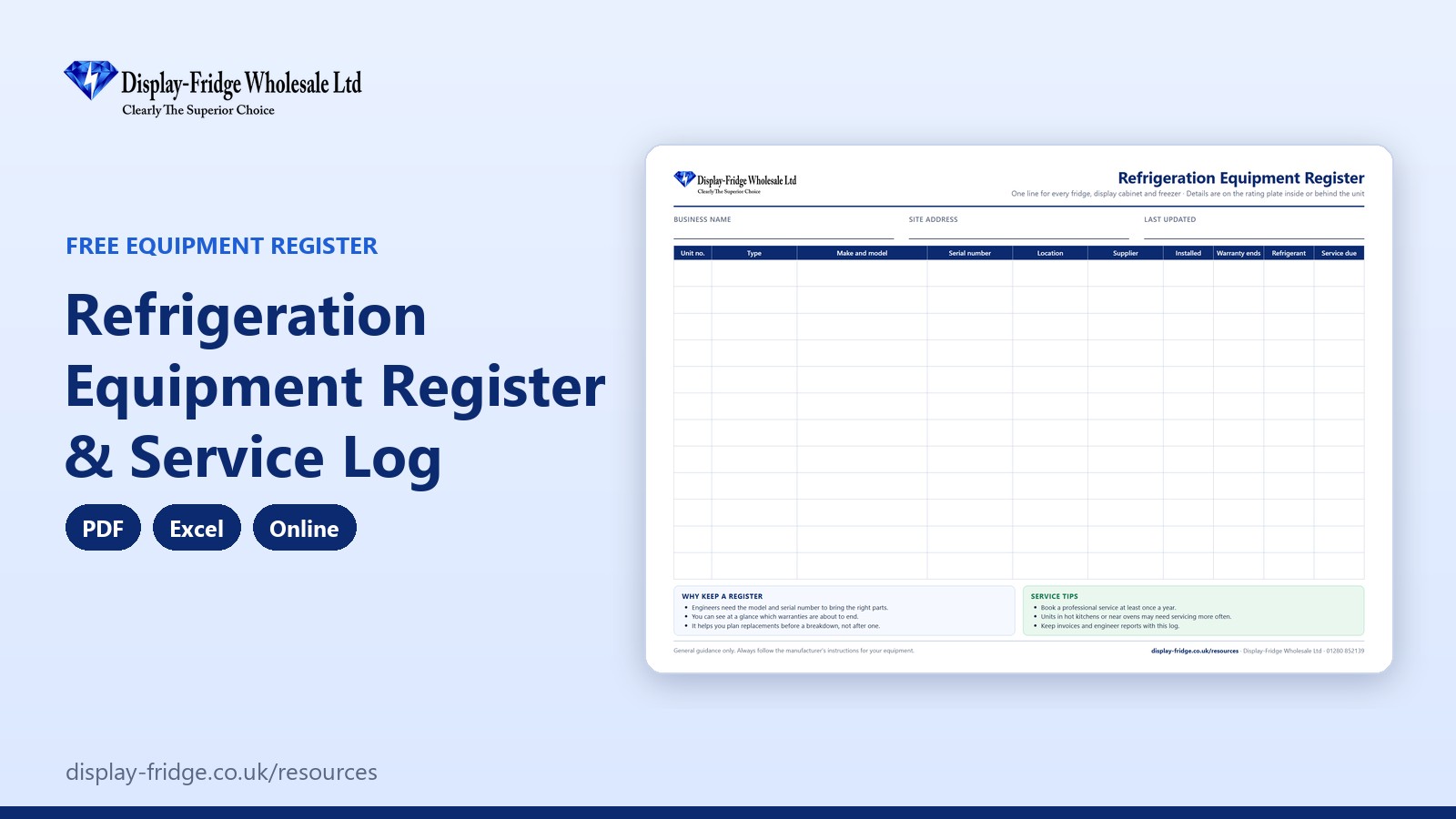
Free Refrigeration Equipment Register & Service Log
A free refrigeration equipment register and service log. Keep one record of every fridge, display cabinet and freezer, with service dates, warranties and repair costs, so nothing is missed.
Use the equipment register online
Online Refrigeration Equipment Register
One row per fridge, display cabinet and freezer. Enter the last service date and how often it should be serviced: the next service and warranty status are worked out for you.
General guidance only; always follow the manufacturer's instructions. Entries are stored only in this browser on this device, so print them for your records.
Free tool by Display-Fridge Wholesale
Frequently asked questions
What is a refrigeration equipment register?
A list of every fridge, display cabinet and freezer in your business, with its make, model, serial number, location, supplier, installation date, warranty and service history.
What is the refrigeration maintenance log for?
It tells you when each unit is due a service, which warranties are about to end and how much each unit has cost in repairs.
Who should keep the equipment register?
The owner or manager, or whoever books engineers and approves repairs.
How often should a commercial fridge be serviced?
At least once a year; every six months for units in hot or busy areas, or as the manufacturer recommends.
Where do I find the model and serial number?
On the rating plate, usually inside the cabinet near the top or on the back of the unit.
Where should the equipment register be kept?
In the office, or on a computer or tablet using the Excel or online version, so it can be updated after every visit.
When should the equipment register be updated?
When a unit is installed or removed, and after every service, repair or breakdown.
When should I replace a commercial fridge rather than repair it?
When it is out of warranty, breaks down repeatedly, struggles to hold temperature or costs more in repairs and electricity than a new unit would cost to buy and run.
How does an equipment register help my business?
Engineers arrive with the right parts, services are not forgotten, warranties are used before they expire and replacement decisions are based on real costs.
Is the online equipment register saved?
Yes, in the browser on your device only. Nothing is sent to us. Print it or download a CSV file regularly.
Your business with our equipment register, and without
| Using our equipment register | Without it | |
|---|---|---|
| Engineer call-outs | Model and serial number ready, so the right parts come first time | A second visit because the part was wrong |
| Services | Next service date for every unit, overdue ones in red | Services forgotten until a unit fails |
| Warranties | Expiry dates visible, so repairs are claimed in time | Paying for repairs that were covered |
| Repair costs | Total cost per unit, so you know when to replace | Money poured into an old unit |
| Budgeting | Ages and condition of every unit at a glance | Surprise replacements |
| Format | PDF, Excel and online, free | Invoices in a drawer |
Why keep an equipment register?
Most food businesses have more refrigeration than they realise: display fridges, storage fridges, under-counter units, freezers and drinks fridges, bought at different times from different suppliers. When one fails, the engineer needs the make, model and serial number; when you plan the budget, you need to know which units are old and expensive to keep running. A register keeps all of that in one place.
What to record for each unit
- Type, make and model, and serial number, from the rating plate inside or behind the cabinet.
- Where it is, who supplied it and when it was installed.
- When the warranty ends.
- The refrigerant, which the engineer will ask about.
- Every service, repair and breakdown, with the cost.
How often to service commercial fridges
A professional service at least once a year is a sensible minimum. Units in hot kitchens, next to ovens or in busy shops may need servicing every six months. A service typically includes cleaning the condenser, checking fans, controls and electrics, and checking the refrigeration system.
Repair or replace?
The register makes this decision easier. A unit that is out of warranty, breaks down several times a year and has a growing repair bill is usually cheaper to replace, especially if a new one uses less energy. The running cost calculator shows how quickly a more efficient model pays for itself.
How to use the equipment register, step by step
Add each unit
Tap ‘+ Add a unit’ and enter its name, type, make and model, serial number, installation date and warranty end date.

Counters for units, overdue services and repair costs Enter the last service and the interval
Type the date of the last service and how often the unit should be serviced, in months. The next service date and the warranty status appear automatically; overdue services turn red.
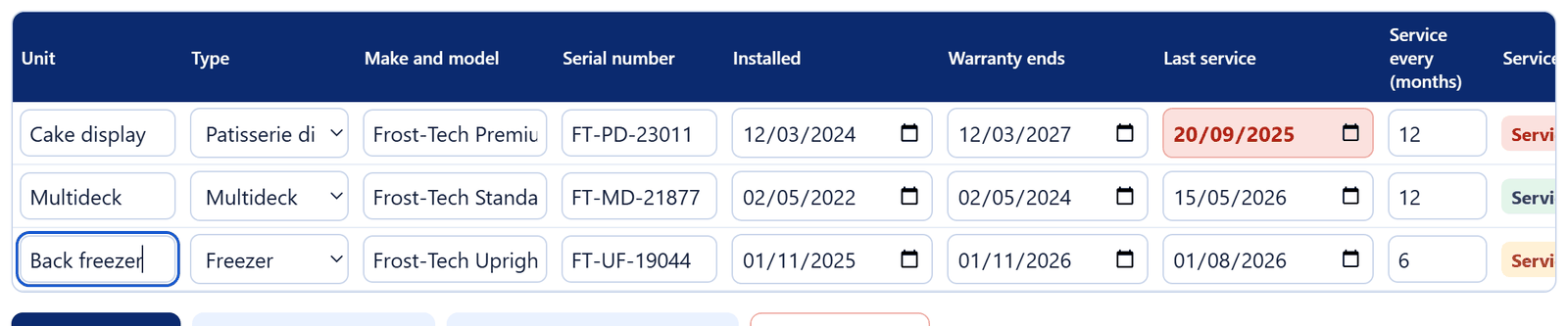
Three units: one service overdue, one warranty expired Update it after every visit
Change the last service date and add repair costs. The Excel version has a separate service log for every visit, linked to each unit.
Keep your records
Print the register or download a CSV file, and keep engineer reports and invoices with it.

Add, print, download and clear buttons
Service tips
- Book services for quieter periods, not just before Christmas or a heatwave.
- Ask the engineer to note the condition of gaskets, fans and the condenser.
- Keep common spare parts such as door gaskets and lights and LED drivers on hand.
- Replace units that keep failing: see our commercial fridges and commercial freezers.
Related free resources
- Fridge Breakdown Emergency Plan: what to do when a unit fails.
- Commercial Fridge Cleaning Schedule: the cleaning that keeps units running between services.
- Running Cost Calculator: compare the running costs of old and new units.
- All free resources.
General guidance only. Always follow the manufacturer’s instructions for your equipment.